




Exploring the Impact of UI/UX Design on Player Experience in Arknights
When it comes to games, UI and UX are two of the numerous elements that influence how long a player will play the game. A player may not stay in the game for very long if the user interface and user experience are difficult to understand; on the other hand, if they are simple and easy to use, they may stay in the game for a long time.
For those who don’t know, Arknights is a mobile tactical role-playing game created by Hypergryph. Beautiful visuals, easy-to-use controls, a vast array of individuals from various backgrounds, an immersive gaming experience, and an ongoing plot are all elements of the game. The Yostar website, one of the businesses in charge of publishing Arknights, made such a claim. Although Yostar asserts that the controls in the game are easy to use, this is a result of both UI and UX design. There’s no further information why Yostar is able to claim those statements.
UI Is More Than Just a Display
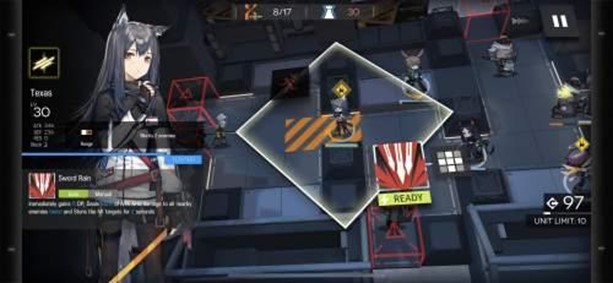
The first thing a player sees when they start an application or close it is the user interface, or UI. UI design controls every interaction, from choosing characters to fighting to navigating menus. The simple yet educational structure of Arknights, which displays important game concepts without overpowering the player, demonstrates the game’s good user interface design. The main page is designed to give users organized access to key elements including the base, hiring, and operations. Players can readily recognize key operations thanks to the use of color contrast and distinguishing icons.
UI Layout and Navigation
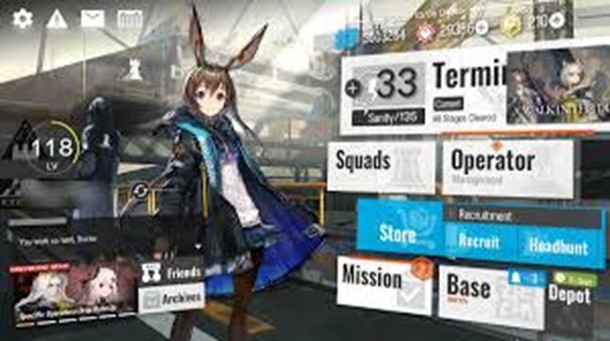
Arknights Dashboard UI
The main interface in Arknights is divided into different sections, each serving a specific function:
Upper-Left Section
- Options — Opens the game settings menu.
- Notice — Displays important messages and announcements.
- Mail — Opens the Mailbox for receiving in-game messages and rewards.
- Daily Sign-In — Displays the Daily Sign-In menu for claiming rewards.
Middle-Left Section
- Displays the player’s level, in-game name, and UID.
- Friends — Takes the player to the Friends menu.
- Archives — Provides access to submenus, including:
- Network of Characters — Shows character interactions and relationships.
- Enemy Units — Displays enemy data.
- Fashion Gallery — Showcases available outfits.
- Intelligence — Allows players to revisit past event cutscenes.
- Path to Glory — Manages and views medals earned.
Bottom-Left Section
- Displays the Assistant Operator’s spoken voice line when entering the main menu, becoming idle, or clicking on their character art.
- Notifies the player about ongoing events and headhunting banners.
Right Section
- Combat — Takes the player to the Terminal for engaging in battles. The current event is also displayed here, allowing direct access.
- Squads — Leads to the Squads menu for team management.
- Operator Management — Opens the Operators menu for character upgrades and modifications.
- Store — Directs the player to the in-game shop.
- Recruitment — Provides access to both the headhunting (gacha) and recruitment systems.
- Mission — Displays a list of missions, including Daily, Weekly, Pinboard, and Campaign tasks.
- Base — Opens the Rhodes Island Infrastructure Complex base for resource management and facility upgrades.
- Depot — Shows a list of acquired in-game items.
UX Enhancing Player Retention
User experience, or UX, is more than just graphics; it’s about how a player engages with the game. A well-designed user experience guarantees that gamers may complete activities without experiencing any difficulties. The instructional section of Arknights exemplifies effective user experience design by presenting new mechanics gradually rather than all at once. A seamless experience is reinforced by the touch controls’ responsiveness and the menus’ smooth transition.
Accessibility is another important aspect of UX. Several quality-of-life features are offered by Arknights, including drag-and-drop ease of use, clear indicators for unit placements, and auto-deployment for stages. By lessening cognitive strain and enabling players to concentrate on strategy rather than fumbling with controls, these components enhance the overall player experience.
Balancing Aesthetics and Functionality
Functionality and aesthetics must be balanced in a successful UI/UX design. In this regard, Arknights shines by providing a visually pleasing aesthetic while preserving useful functionality. The animations and effects in the game are subdued enough to not interfere with gameplay, and the dark yet lively graphic design creates an immersive atmosphere. Additionally, the user interface adjusts to multiple screen sizes, guaranteeing a consistent experience on a range of devices.
Conclusion
Player involvement in Arknights is significantly shaped by the UI and UX design. While smooth gameplay and a well-organized UI encourage extended gaming sessions, accessibility features and simple mechanisms make sure that complexity doesn’t put off novice gamers. From a UI/UX perspective, Yostar’s assertion of user-friendly controls is correct, showing that careful design decisions may improve player retention and enjoyment.
Comments :